Skip to content

QuickBite — Food Delivery App With Live Order Tracking

{ CASE STUDY DETAILS }

The problem, the decisions we made, and what actually changed for the client after launch

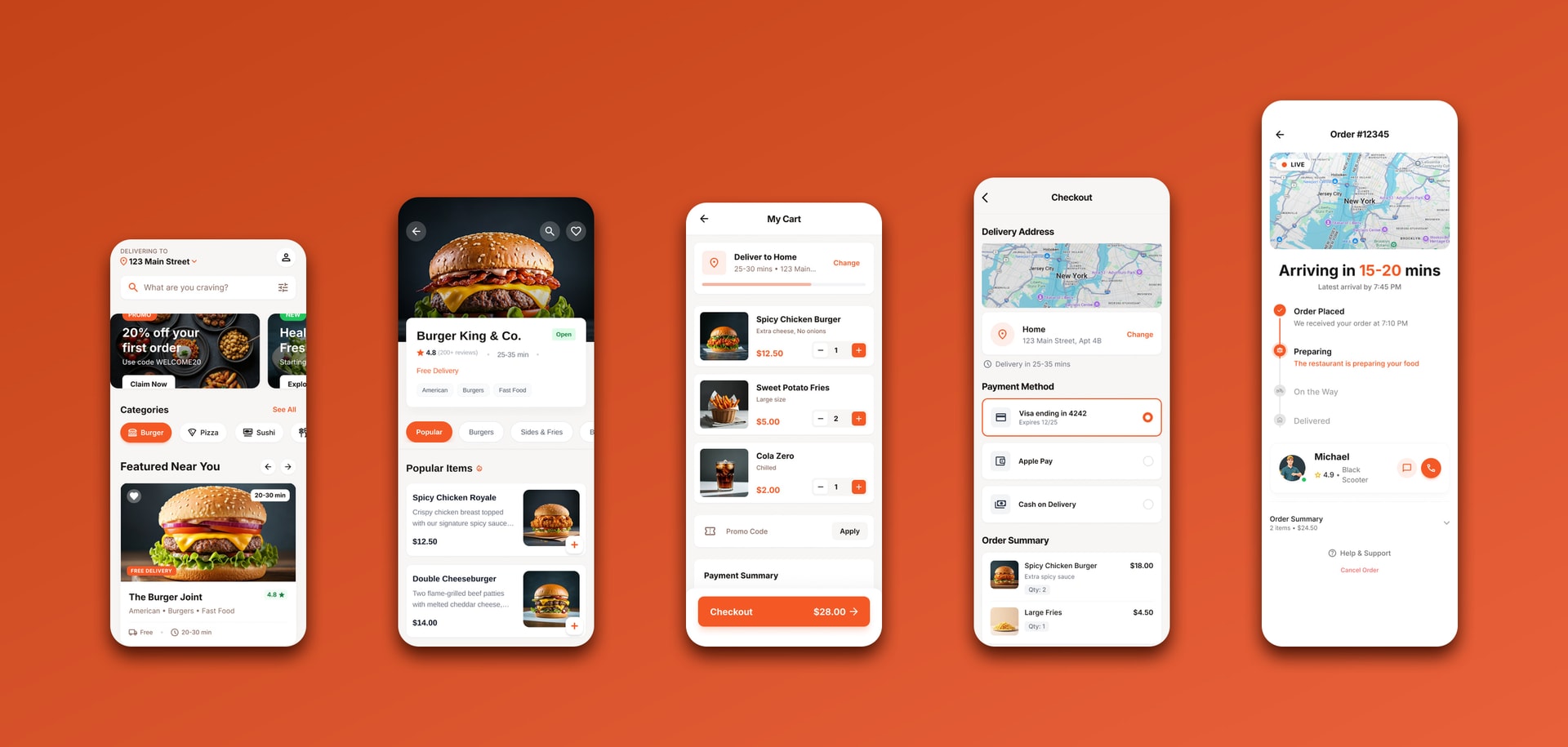
Five QuickBite screens in order — home, restaurant menu, cart, checkout and live order tracking

PROJECT NAME:

QuickBite — Food Delivery App

INDUSTRY:

Food & Delivery

ENGAGEMENT:

Customer app build + launch

DESIGN:

Sabariya Muzumder

TOOLS USED:

React Native, Node.js, PostgreSQL, Socket.IO, Stripe

LOCATION:

Dhaka, Bangladesh

Every Screen Between Hungry And Fed Is A Chance To Lose Someone

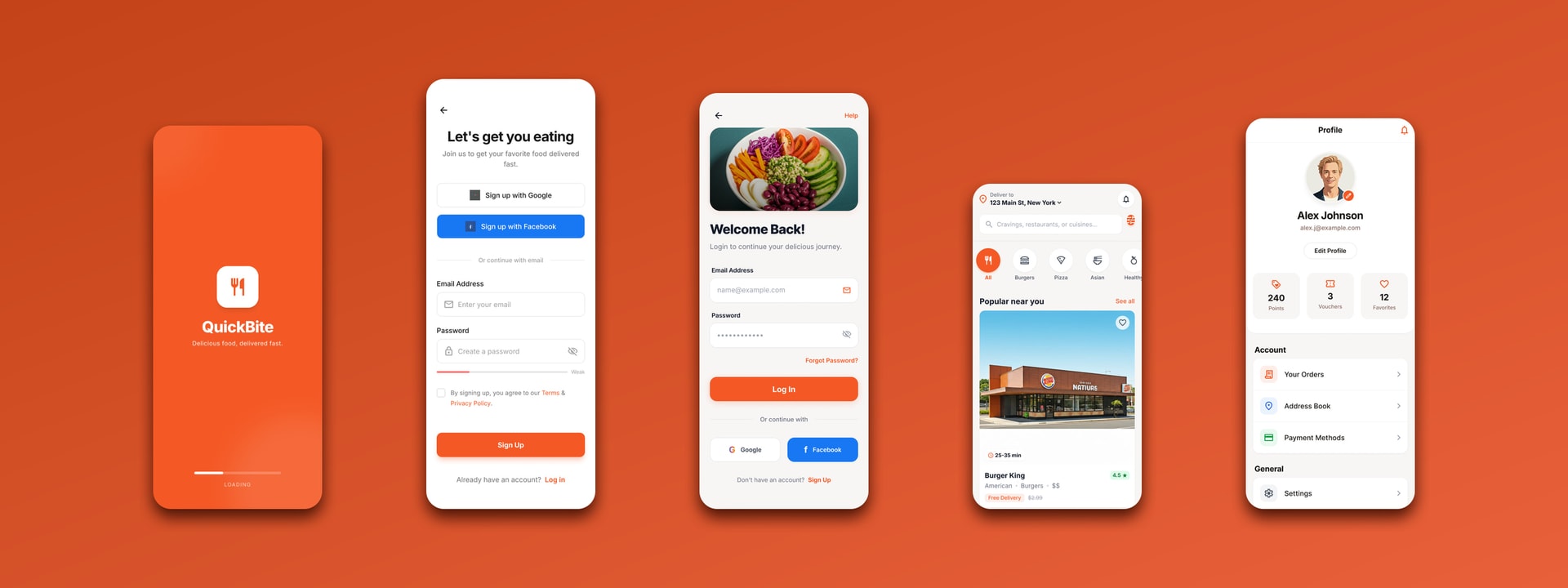
Ordering food on a phone is a sequence of small decisions — where to deliver, what to eat, from whom, how to pay — and a customer can abandon the order at any one of them. We built QuickBite as a single uninterrupted path through those decisions: ten screens where each one resolves its question and hands over the next, from the address at the top of the home screen to the courier’s name on the tracking map.

QuickBite splash, sign-up, log-in, browse and profile screens in a row

Problem:

Food Apps Lose People Between The Screens, Not On Them

A delivery app is judged on how little thought it takes to get from opening it to eating. The individual screens are rarely where that goes wrong — a menu is a menu. It goes wrong in the joins: an address asked for twice, a cart that forgets why an item was added, a payment step that leaves the app, an order that disappears the moment it is placed. We had to treat the whole sequence as the product, on a phone, in a category where every competitor is one tap away.

Key issues identified:

  1. Discovery Before Appetite: A customer who does not know what they want needs categories and promotions; one who does needs search. Both land on the same home screen.
  2. A Cart That Has To Stay Editable: Quantities change at the last second, and a cart that makes that awkward is a cart that gets abandoned at the total.
  3. Silence After Checkout: The riskiest minute in a delivery order is the one just after paying, when nothing on screen says the food exists.
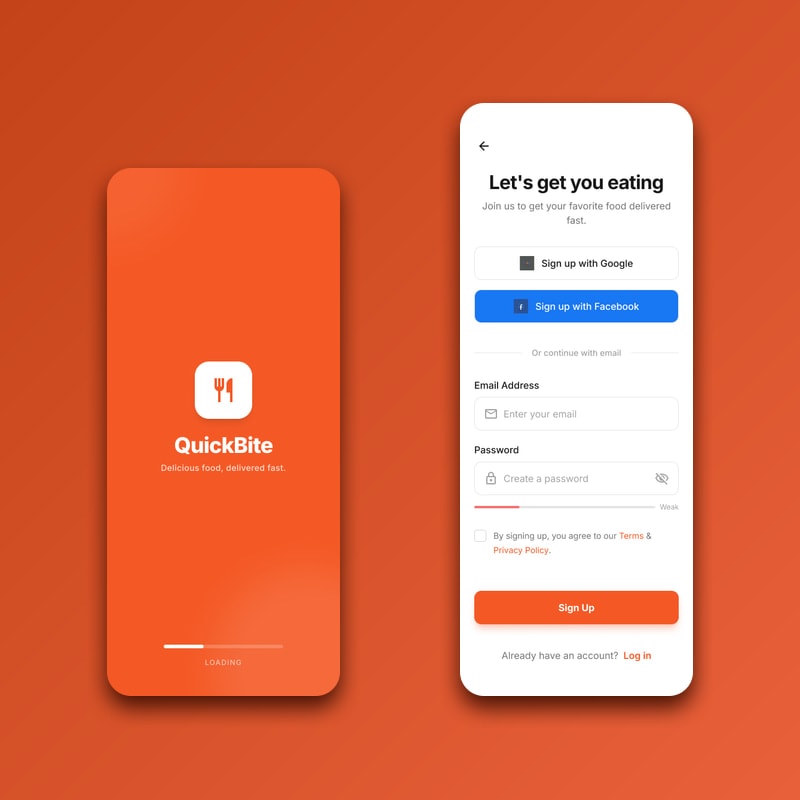
QuickBite splash screen beside the sign-up screen offering Google, Facebook and email
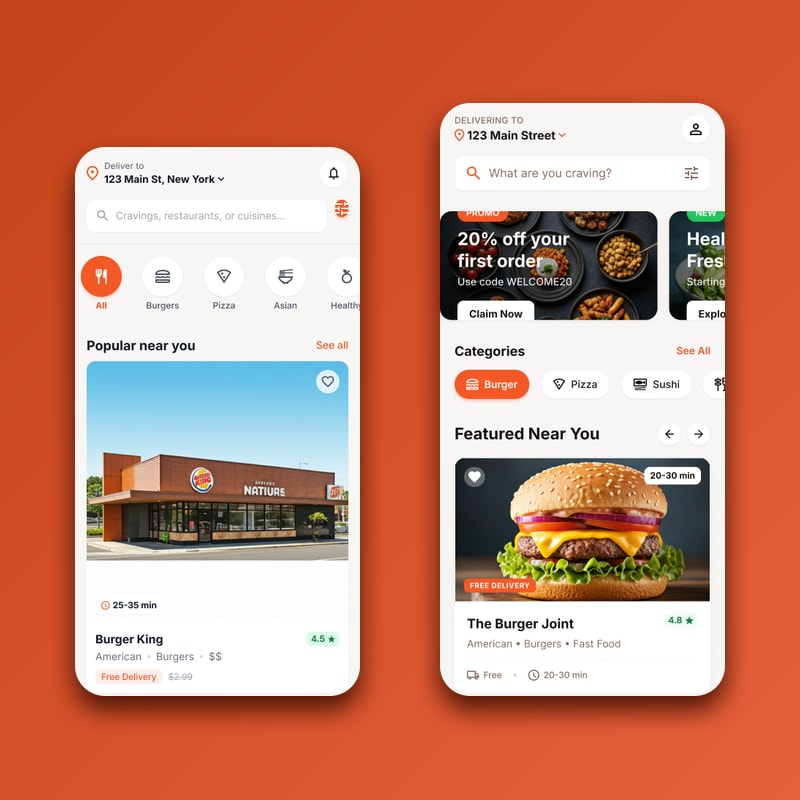
QuickBite browse screen beside the home screen showing promotions, categories and featured restaurants
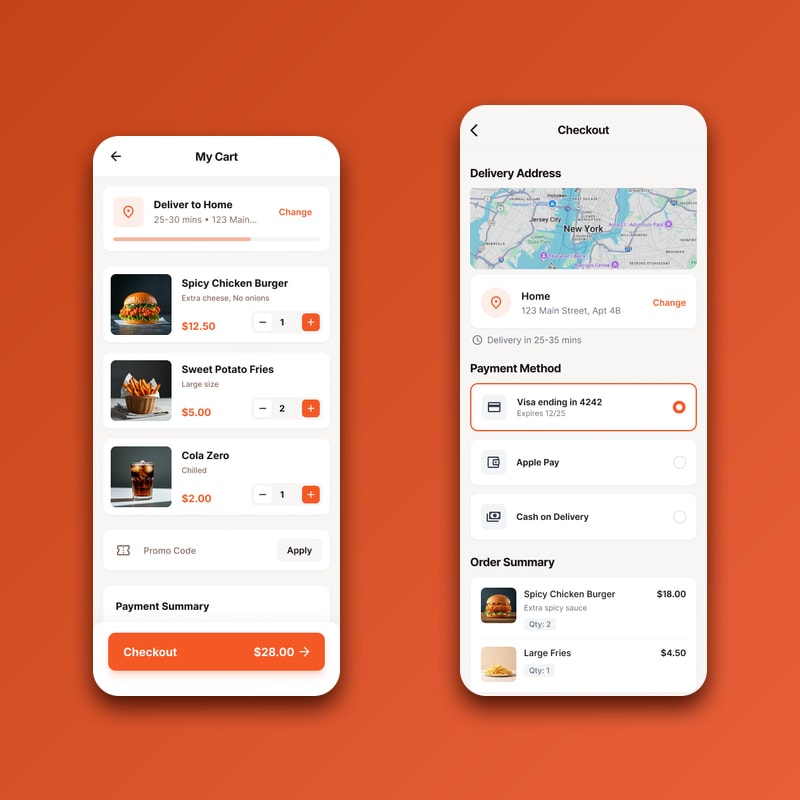
QuickBite cart with quantity steppers beside the checkout screen’s payment methods and order summary

Solution:

One Path, Carried By The Same Three Elements

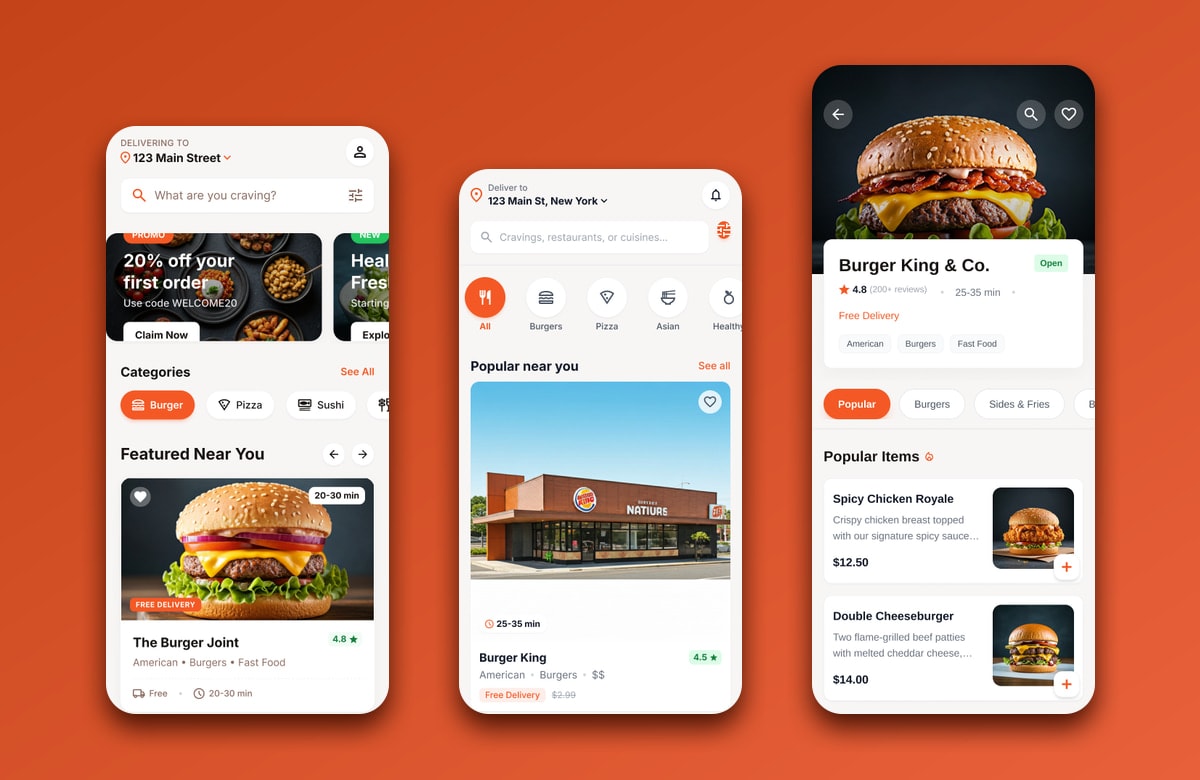
Discovery opens on the delivery address rather than a logo, because it is the one fact every price and delivery time below it depends on — change it and the whole screen requeries. Search sits under it for people who already know what they want, and a promotion rail, a category row and a featured list sit under that for people who do not. The restaurant screen keeps the same shape as the home screen — photograph, rating and delivery time, then items — so moving between restaurants never means relearning a layout.

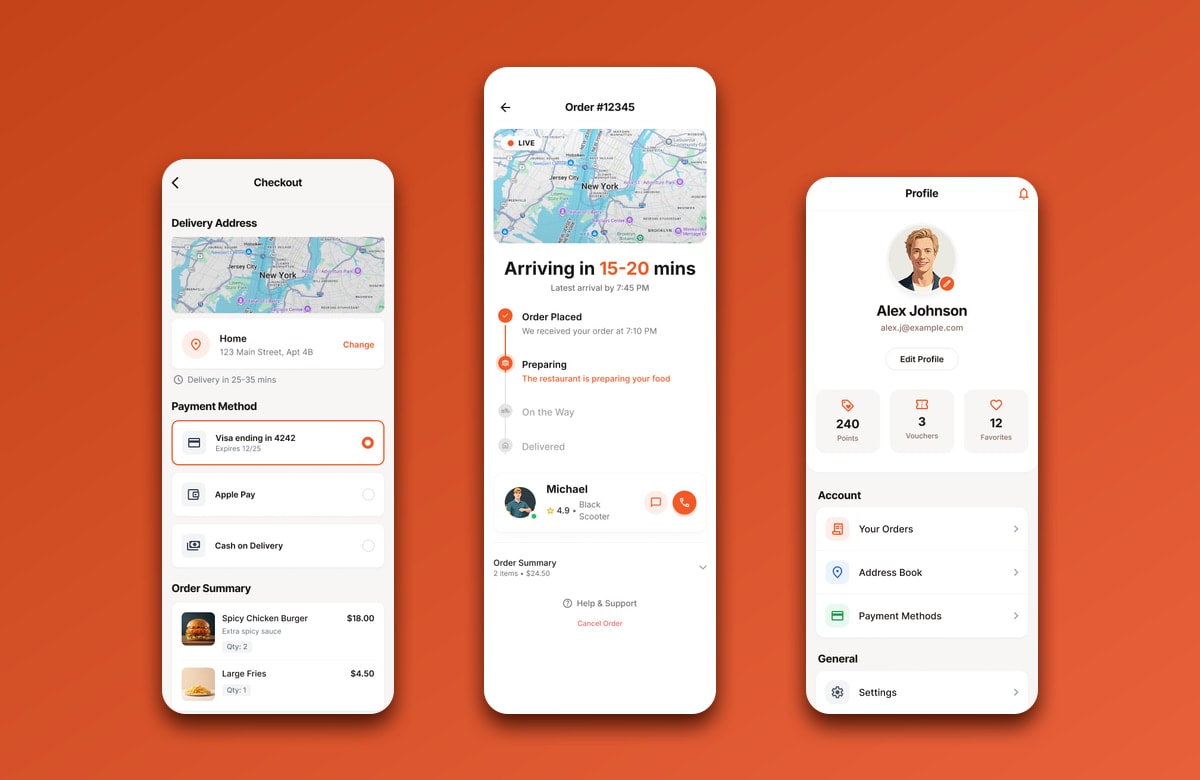
From the cart onward the app stops selling and starts confirming. Quantity steppers stay on every line to the last screen, the delivery address and estimate repeat at checkout rather than being taken on trust, and three payment routes — saved card, Apple Pay and cash on delivery — resolve in place through Stripe without the customer ever leaving the app. Placing the order drops straight onto a live map: courier positions arrive over a socket, the four-state timeline advances off those same events rather than off a poll, and the courier’s name, rating and vehicle are on screen from the moment the restaurant accepts.

QuickBite home, browse and restaurant menu screens showing discovery from address to dish
QuickBite checkout, live order tracking and rewards profile screens

Key Takeaways:

Repetition Is What Makes A Flow Feel Short

The screens that work hardest in this build are the ones that repeat something the customer has already seen. The address appears on the home screen, again in the cart, again at checkout; the order total appears beside the checkout button and again in the summary; the delivery estimate appears on the restaurant card, the cart and the tracking map. None of it is new information, and that is the point — each repetition removes a reason to scroll back and check, which is the most common way a food order stalls.

What this project reinforced:

  1. Open On The Decision, Not The Brand: Leading the home screen with the delivery address settles the variable that every price and time below it depends on.
  2. Keep Editing Available Late: Quantity controls that survive to the checkout screen cost one row and remove the reason to go back a step.
  3. Push, Do Not Poll: The minute after payment is the one that has to feel alive, and a socket carrying courier positions costs less battery than asking again every few seconds.

Outcomes & Impact:

Checkout Completion

+34%

Keeping the quantity controls and the delivery estimate on the checkout screen cut the carts abandoned at the total.

Repeat Orders

62%

Of first-time customers ordered again within a month, with the saved address and payment method already in place.

Time To Order

90s

Median time from opening the app to a placed order, measured across the three busiest restaurant categories.

Support Contacts

-41%

The live map and its four-state timeline removed most of the messages that used to follow a confirmed order.

© Client Feedback

//028 Delivered

Why teams keepbuilding with us

We do not just finish projects — we stay on after launch. Here is what the teams we shipped for have to say.

Two colleagues collaborating over a laptop

[ FAQ ]

Questions We GetAsked Most

Timelines, pricing, ownership and what happens after launch — laid out plainly before we begin.

QUESTION [6+]

Still have questions?

Ask us anything

// A focused MVP usually ships in 8–12 weeks. Larger SaaS platforms and multi-tenant systems run 4–6 months, delivered in two-week increments so you see working software throughout rather than at the end.